
Recently, I was working on extending an embedded SCADA protocol converter running on an industrial router. The task was to implement support for a relatively uncommon IEC 60870-5 message type: Regulating Step Command.
This command is not frequently used, but it appears in specific control scenarios—typically where incremental adjustments (rather than absolute setpoints) are required.
The target use case involved:
The goal was to correctly translate a Regulating Step Command received over IEC104 into the corresponding action on an IEC101 RTU.
To validate the implementation, I used the VestaTel SCADA Multi-Protocol Simulator to emulate both ends of the system:
This allowed me to test the full command flow without requiring any physical devices.
In this setup:
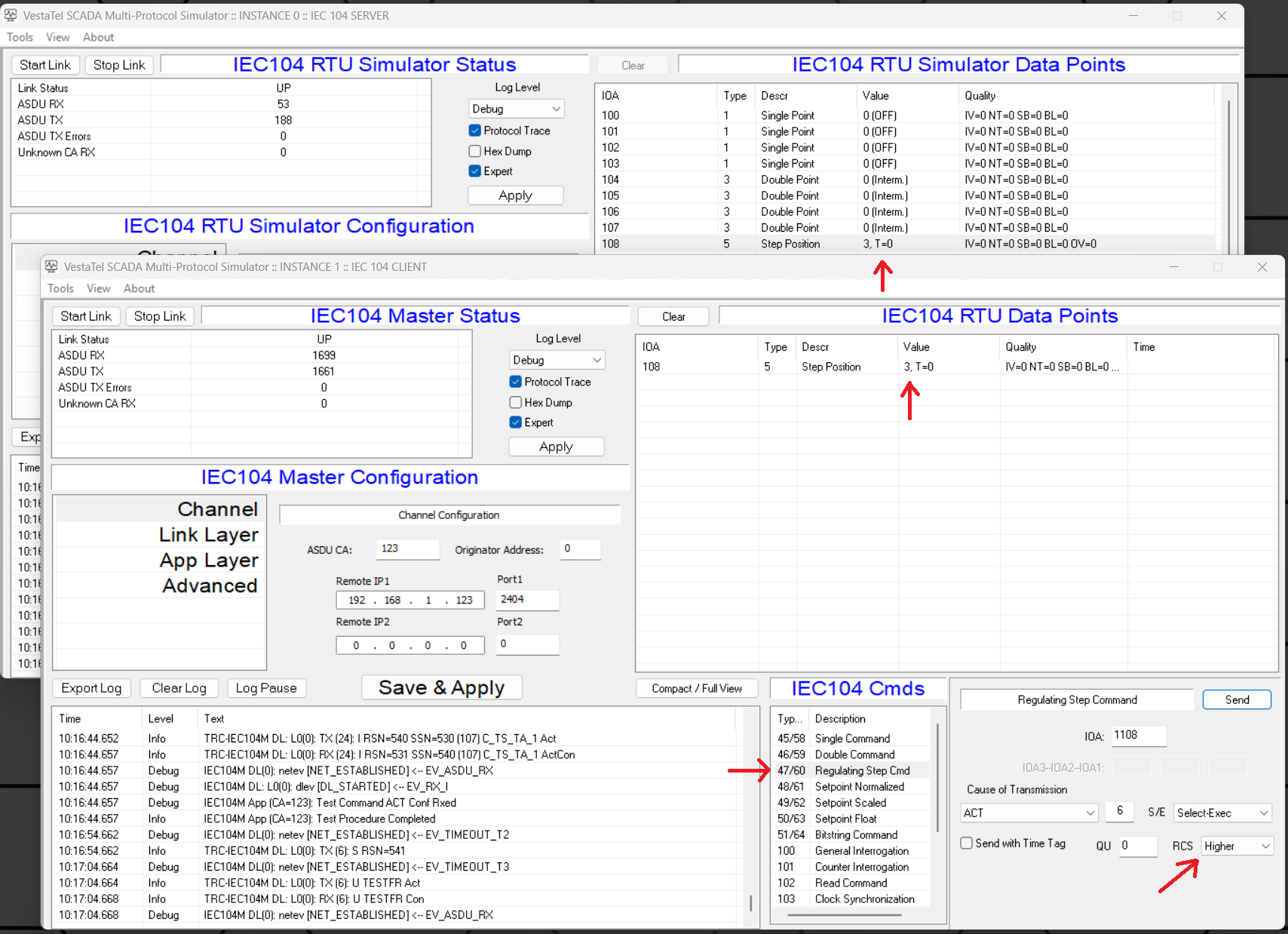
Once the command was received by the RTU simulator:
This effectively simulates a real-world regulating device where adjustments are made step-by-step.
One useful aspect of this setup was full visibility on both sides:
This made it easy to verify:
Testing this type of functionality against real hardware would have been:
Using the simulator, I was able to:
Even for relatively niche protocol features like Regulating Step Command, having a flexible multi-protocol simulation environment makes development and debugging significantly more efficient.